Integrations
Works with your website
Easily sell tickets directly on your existing site and Instagram account. DoorSplit integrates with every major website platform — no coding required. Just paste a snippet or install a plugin.
 WordPress
 Drupal
 Webflow
 Squarespace
 Wix
Wix Shopify
Sell tickets from Instagram
No embed code needed. Just grab your event's direct link from your DoorSplit dashboard and paste it in your Instagram story, post, or bio. When fans tap the link, they land on your event page and can buy tickets in seconds with Apple Pay, Google Pay, or card.
Open your event in the DoorSplit dashboard and copy the public event link
Paste the link in your Instagram bio (band, venue, or promoter account)
Fans tap the link → land on your event page → buy tickets instantly
Works with any social platform that supports a bio link — Instagram, TikTok, Facebook, X, and more.
@yourbandname
Portland, OR
Portland rock band 🎸 New album out now!
🎟️ Tickets to our next show ⬇️
Bio link
doorsplit.app/event/your-event-id
Fans tap → event page → buy tickets
Embed Widget
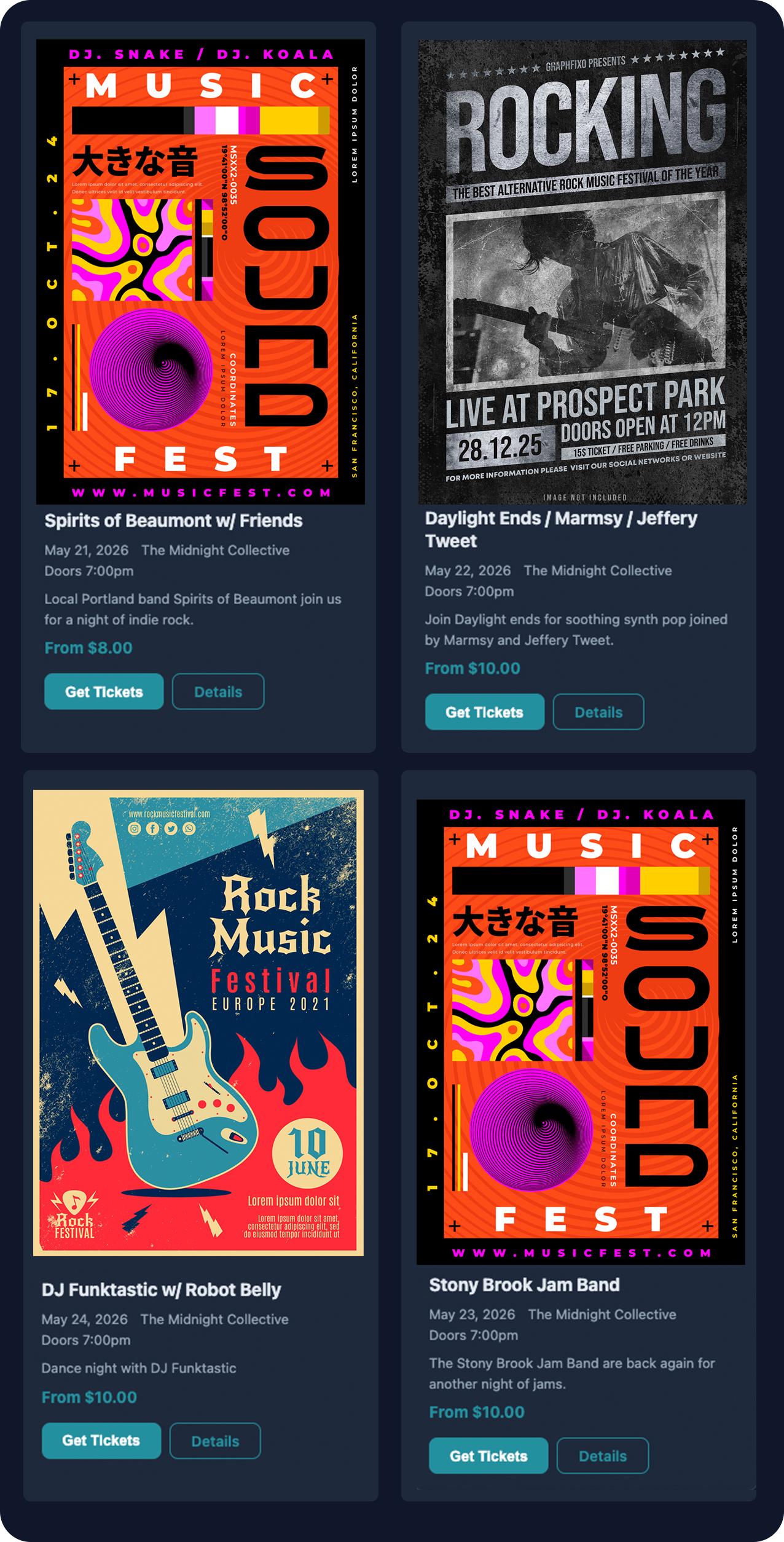
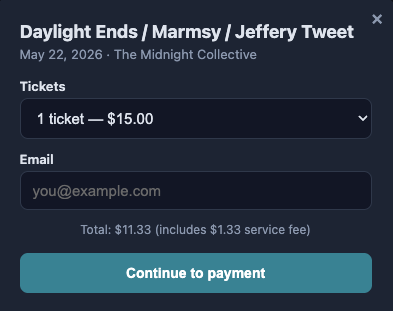
Drop a fully customizable event widget onto any website with a single code snippet. Your events display with live pricing, poster images, and a built-in checkout flow — visitors buy tickets without ever leaving your site.
Get started in seconds
<div id="doorsplit-events"></div>
<script src="https://api.doorsplit.app/widget/v1/embed.js"
  data-org-slug="YOUR_ORG_SLUG"
  async></script>
Replace YOUR_ORG_SLUGwith your organization's slug from the DoorSplit dashboard.
Fully customizable
Tailor every aspect of the widget to match your brand and website design. All settings are controlled via simple HTML attributes or managed from your organization dashboard.
3 layout options
Card grid with posters, horizontal list rows, or a compact text-only view.
Theme & colors
Light or dark theme with custom accent, background, and text colors to match your brand.
Inline checkout
Popup checkout modal so fans can purchase tickets without leaving your page. Or redirect to DoorSplit.
Content controls
Toggle poster images, descriptions, venue, date, and price visibility per widget.
Multiple configurations
Save up to 3 widget configs per org — one for your homepage, another for a sidebar, another for a partner site.
Always live
Events update automatically. No rebuilds, no caching issues. Pricing and availability are always current.
Configuration examples
Use data- attributes to customize the widget directly in your HTML snippet. You can also manage these from the Embed Widget section of your organization settings.
Dark theme with custom accent
<script
  src="https://api.doorsplit.app/widget/v1/embed.js"
  data-org-slug="midnight-club"
  data-theme="dark"
  data-accent-color="#2dd4bf"
  data-layout="card"
  async></script>
Compact list, no posters
<script
  src="https://api.doorsplit.app/widget/v1/embed.js"
  data-org-slug="bright-spurs"
  data-layout="compact"
  data-show-poster="false"
  data-max-events="3"
  async></script>
Single event embed
<script
  src="https://api.doorsplit.app/widget/v1/embed.js"
  data-event-id="YOUR_EVENT_ID"
  data-show-description="true"
  async></script>
Redirect checkout (no popup)
<script
  src="https://api.doorsplit.app/widget/v1/embed.js"
  data-org-slug="bright-spurs"
  data-checkout="redirect"
  async></script>
Available attributes
data-org-slugOrganization slug (recommended)data-org-idOrganization IDdata-event-idShow a single specific eventdata-layout"card" (default), "list", or "compact"data-theme"light" (default) or "dark"data-accent-colorCSS color for buttons and accentsdata-bg-colorCustom background colordata-text-colorCustom text colordata-show-posterShow event poster images (default true)data-show-descriptionShow event description (default true)data-max-eventsMaximum events to display (default 50)data-checkout"popup" (default) or "redirect"data-containerCSS selector for target elementPlatform-specific setup
Webflow
Embed WidgetAdd a DoorSplit embed to any Webflow page using the Embed element. Your events update automatically — no republish needed.
Open your page in the Webflow Designer
Drag an Embed (custom code) element where you want events to appear
Paste the DoorSplit snippet (see below)
Publish your site — events load live from DoorSplit
Squarespace
Embed WidgetUse a Squarespace Code Block to embed DoorSplit events on any page. Works with all Squarespace templates.
Edit a page and add a Code Block
Switch to the HTML editor (not Markdown)
Paste the DoorSplit snippet
Save and preview — your events appear instantly
Wix
Embed WidgetAdd DoorSplit to your Wix site with the HTML iFrame or Embed a Widget feature. No coding knowledge required.
In the Wix Editor, click Add (+) → Embed Code → Custom Embed
Choose "Embed a Widget" (or HTML iFrame)
Paste the DoorSplit snippet into the code field
Position and resize the widget on your page
Shopify
Embed WidgetEmbed DoorSplit events on your Shopify store pages. Perfect for venues and artists who sell tickets alongside merchandise.
Go to Online Store → Themes → Customize
Add a Custom Liquid section to your page
Paste the DoorSplit snippet
Save — events display with live pricing and ticket links
Add to Apple Wallet
After purchasing tickets, buyers receive an email with their ticket QR code and an “Add to Apple Wallet” button. One tap saves the ticket to their wallet for instant access at the door — no searching through emails, no screenshots, no app to download.

Your Ticket
Show this QR code at the door
Official Plugins
Full-featured integrations with admin panels for managing organizations, events, and embeds directly from your CMS.
WordPress
Official PluginInstall the official DoorSplit plugin. Manage events from your WordPress admin and embed ticket sales with a simple shortcode.
Download the plugin from GitHub and upload to wp-content/plugins/
Activate DoorSplit in Plugins → Installed Plugins
Go to the DoorSplit menu and sign in with your account
Use [doorsplit_events org_id="YOUR_ORG_ID"] on any page or post
Drupal
Official ModuleInstall the official DoorSplit module. Create and manage events from your Drupal admin panel, or place the Events block in any region.
Copy the doorsplit/ folder to modules/custom/ and enable with drush en doorsplit
Go to Configuration → Web services → DoorSplit and sign in
Manage organizations and events from the admin tabs
Place the DoorSplit Events block via Structure → Block layout
Any Other Website
If your platform isn't listed above, the embed widget works anywhere you can add custom HTML. That includes:
Need the raw API instead? Check out the API documentation for full control over event data, checkout, and ticket management.
Ready to add tickets to your site?
Sign up, create your event, and grab the embed code. Takes about two minutes.